
AutoSense Logo Black Horizontal
Use this black horizontal logo file for AutoSense in marketing materials, presentations, and digital applications.

Manuals, spec sheets, sell sheets, instructions, and CAD blocks for the QuickFreeze product line.
62 documents
Use this black horizontal logo file for AutoSense in marketing materials, presentations, and digital applications.
Updated May 10, 2026 AutoSense Logo

Download the AutoSense logo in black vertical format for use in your marketing materials and brand communications.
Updated May 10, 2026 AutoSense Logo

Use the horizontal AutoSense logo in color format for your marketing materials and branded communications.
Updated May 10, 2026 AutoSense Logo

Use this vertical-oriented logo file when you need the AutoSense brand mark in color for your marketing materials.
Updated May 10, 2026 AutoSense Logo

Use this horizontal AutoSense logo with white text on dark backgrounds for your marketing materials and digital applications.
Updated May 10, 2026 AutoSense Logo

Use this vertical AutoSense logo with white text for applications requiring a stacked layout on dark backgrounds.
Updated May 10, 2026 AutoSense Logo

Download the white horizontal version of the AutoSense logo for use in your marketing materials and branding applications.
Updated May 10, 2026 AutoSense Logo

Use this white vertical logo file for AutoSense branding on dark backgrounds and digital applications.
Updated May 10, 2026 AutoSense Logo
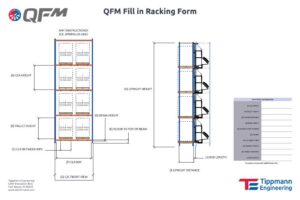
Use this template to document racking configurations and specifications for your QuickFreeze modular system installations.
Updated May 10, 2026 QFM Form/Template

Display QuickFreeze's distinctive patented logo design for use across your marketing materials and brand communications.
Updated May 10, 2026 Cross-Product Logo
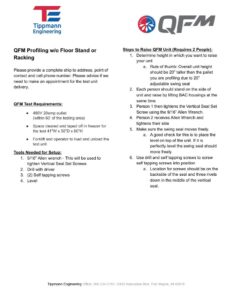
Step-by-step instructions for setting up and positioning your QFM Profiling Unit without a floor stand.
Updated May 10, 2026 QFM Instructions

Download the QuickFreeze static black emblem icon for use in your marketing materials and brand communications.
Updated May 10, 2026 QuickFreeze System Logo

Download the QuickFreeze logo in white for use in presentations, websites, and marketing materials.
Updated May 10, 2026 QuickFreeze System Logo

Download the standalone QuickFreeze logo for use in your marketing materials and brand communications.
Updated May 10, 2026 QuickFreeze System Logo

Learn proper pallet stacking, product placement, loading requirements, and maintenance procedures for your QuickFreeze System.
Updated May 10, 2026 QuickFreeze System Manual

Learn key features, specifications, and benefits of the QFM 2-sided freezer model for retail sales presentations.
Updated May 10, 2026 QFM Sell Sheet
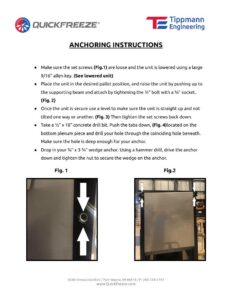
Step-by-step guidance for properly positioning, leveling, and securing your QFM unit to the floor with anchors.
Updated May 10, 2026 QFM Instructions
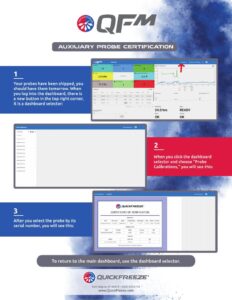
Learn proper calibration procedures and validation requirements for QFM auxiliary probes to ensure accurate temperature monitoring.
Updated May 10, 2026 QFM Instructions
Download ready-to-use CAD blocks for QFM equipment to streamline your design and documentation processes.
v359.1 Updated Jun 8, 2026 QFM CAD Block
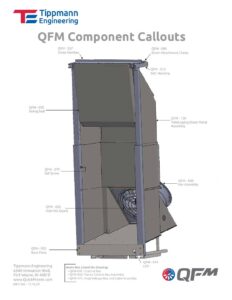
Identify and locate all QFM component parts including cross members, fan assemblies, seals, and control box connections.
Updated May 10, 2026 QFM Instructions
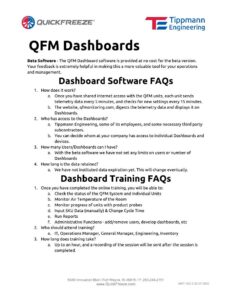
Find answers to common questions about using the QFM Dashboard, including setup, navigation, and troubleshooting tips.
Updated May 10, 2026 QFM Instructions
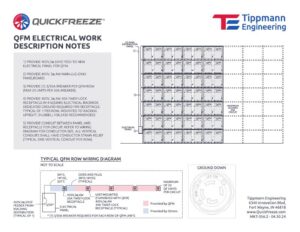
Complete electrical specifications and technical data for QuickFreeze QFM equipment rated at 400 volts.
Updated May 10, 2026 QFM Submittal
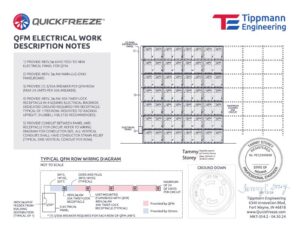
Find electrical specifications, wiring diagrams, and installation requirements for the QFM 480v 30 Amp configuration.
Updated May 10, 2026 QFM Submittal
Complete technical specifications and installation guidelines for QFM electrical systems, racking hardware, and network connectivity components.
Updated May 10, 2026 QFM
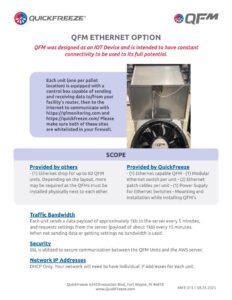
Learn the technical specifications and ordering details for QFM Ethernet connectivity options.
Updated May 10, 2026 QFM Spec Sheet

Learn how to set up and manage secure WiFi connections with your QFM Internet Security software.
v8 Updated May 13, 2026 QFM Instructions
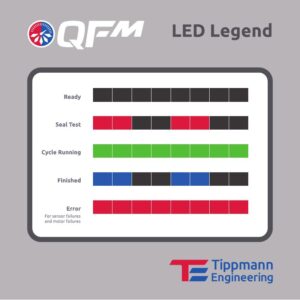
Learn how to interpret LED indicator lights and troubleshoot common status signals on your QFM equipment.
Updated May 10, 2026 QFM Instructions

Download the QuickFreeze Maintenance grey logo for use in your marketing materials and brand applications.
Updated May 10, 2026 QFM Logo

Download the QuickFreeze Marketing white logo file for use in your marketing materials and brand applications.
Updated May 10, 2026 QFM Logo

Learn installation, operation, and maintenance procedures to ensure reliable QFM performance and troubleshoot common issues.
Updated May 10, 2026 QFM Manual

Learn the step-by-step process for profiling QFM SKUs, including control box setup and cable management.
Updated May 10, 2026 QFM Presentation
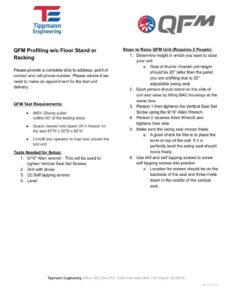
Step-by-step instructions for assembling and leveling your QFM Profiling Unit, including required tools and setup requirements.
Updated May 10, 2026 QFM Instructions
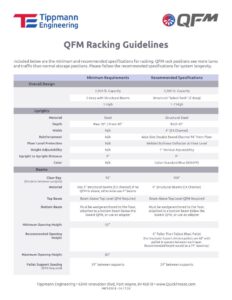
Learn proper installation, spacing, and safety requirements for QFM racking systems to maximize storage efficiency and equipment performance.
Updated May 10, 2026 QFM Instructions
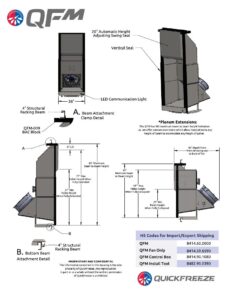
Discover the QFM's detailed technical specifications, dimensions, performance ratings, and operating requirements.
Updated May 10, 2026 QFM Spec Sheet
Learn essential QFM features and best practices through our latest training presentation designed for new and experienced users.
Updated May 10, 2026 QFM Presentation

Learn QFM's Wi-Fi requirements, network security standards, bandwidth needs, and how QFM communicates with your WMS system.
Updated May 10, 2026 QFM Spec Sheet

Learn key features, specifications, and benefits of the QuickCool QFM freezer model to support your sales conversations.
Updated May 10, 2026 QFM Sell Sheet

Learn how QuickFreeze's intuitive interface and rapid freezing technology can streamline your workflow in minutes.
Updated May 10, 2026 QuickFreeze System Video

Download the grey version of the QuickFreeze logo for use in your marketing materials and branded communications.
Updated May 10, 2026 QuickFreeze System Logo

Download the official QuickFreeze vertical logo in high-resolution format for your marketing and branding materials.
Updated May 10, 2026 QuickFreeze System Logo

Download the vertical-format QuickFreeze logo in white for use in your marketing materials and branding applications.
Updated May 10, 2026 QuickFreeze System Logo

Download the official QuickFreeze black logo for use in your marketing materials and communications.
Updated May 10, 2026 QuickFreeze System Logo

Download the QuickFreeze white logo asset without the dial element for your marketing and branding materials.
Updated May 10, 2026 QuickFreeze System Logo

Download the official white QuickFreeze logo for use in your marketing materials and brand communications.
Updated May 10, 2026 QuickFreeze System Logo

Discover how QuickFreeze's patented freeze technology delivers competitive advantage and faster ROI versus traditional pallet freezing methods.
Updated May 10, 2026 QuickFreeze System Brochure
Download ready-to-use metric CAD blocks for QFM thermal management components to accelerate your design layouts.
Updated May 10, 2026 QFM CAD Block
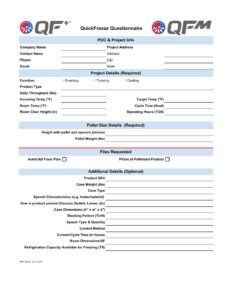
Capture your facility specifications and product details to help QuickFreeze engineers design an optimized freezing or thawing system for your needs.
Updated May 10, 2026 QuickFreeze System Form/Template
Gather essential customer information and system requirements with our comprehensive questionnaire template.
Updated May 10, 2026 QuickFreeze System Form/Template
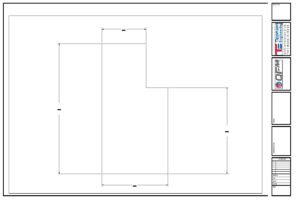
Standardized form for documenting roll-formed beam specifications, dimensions, and project details on technical drawings.
Updated May 10, 2026 QFM Form/Template
Download ready-to-use CAD blocks for Spartan products to streamline your design and drafting workflows.
Updated May 10, 2026 Spartan CAD Block